
Ansible自动化运维(一期)
千山
一、为何要自动化运维
公司新采购了20台机器,安装了rockylinux8.10。
要求:
1、创建运维帐号,www
2、修改ssh配置,把22端口修改为10022
3、安装vim ,wget,curl
4、设置时区
5、安装JDK
6、安装nginx

每台10分钟
20*10=200分钟
由此引出自动化的概念,批量管理的概念
shell
Fabric
saltstack   #ansible
Puppet
Chef
Ansible     #redhat
Ansible的优势
无代理agentless
SSH
YAML
幂等性
模块丰富
学习成本低(python)
二、Ansible简述
2.1、Ansible定义
Ansible是一款开源的自动化运维工具。基于python开发的,它融合了Fabric、Puppet、Chef等批量运维工具的优点。它 能实现:
批量系统配置
批量程序部署
批量运行命令
Ansible的核心理念
让运维变得简单,高效,可重复。
Ansible其实它只是一个平台,框架,真正干活的是它的一些模块。
2.2、Ansible的构架图
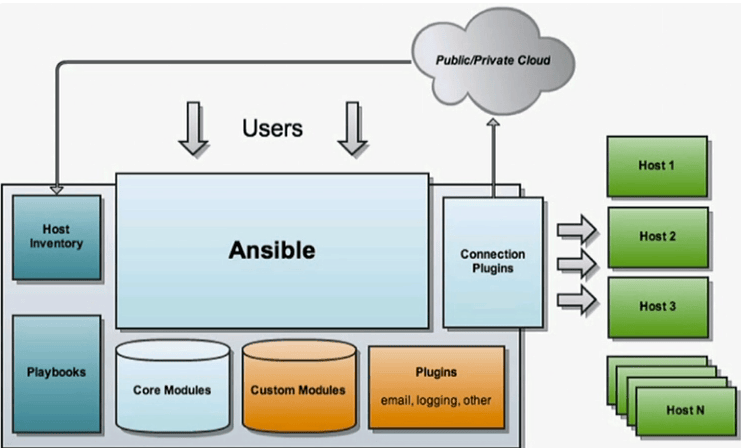
连接插件:—————-
SSH:针对linux系统
WinRM:针对windows
模块::——————-
核心模块
自定义模块
插件:———-
扩展它的附加功能
剧本:——————-
编排任务
资产(inventory)———-
你要操作的目标
2.3、Ansible的工作原理
1、Ansible通过SSH工具或WinRM工具连接到目标机(被管理机)
2、连接成功后,将Ansible的相应模块,推送到目标机(被管理机)
3、模块在目标机上执行指令,将系统达到我们期望的状态
4、任务完成后,推送过去的资源(模块等)会被自动删除。
┌──────────────────────────────────────────────────────────────────┐
│                        控制节点(Control Node)                   │
│                                                                  │
│   ┌─────────────┐    ┌─────────────┐    ┌─────────────┐         │
│   │  Playbook   │    │  Inventory  │    │   Modules   │         │
│   │  (剧本)    │    │ (主机清单) │    │  (模块)    │         │
│   └──────┬──────┘    └──────┬──────┘    └──────┬──────┘         │
│          │                  │                  │                │
│          └──────────────────┼──────────────────┘                │
│                             ▼                                   │
│                    ┌─────────────────┐                          │
│                    │  Ansible 引擎    │                          │
│                    │ (核心调度框架)  │                          │
│                    └────────┬────────┘                          │
│                             │                                   │
│                    ┌────────▼────────┐                          │
│                    │  连接插件        │                          │
│                    │  SSH / WinRM    │                          │
│                    └────────┬────────┘                          │
└─────────────────────────────┼────────────────────────────────────┘
                              │
                              │ ① 建立连接
                              │ ② 推送模块
                              ▼
          ┌───────────────────┼───────────────────┐
          │                   │                   │
          ▼                   ▼                   ▼
   ┌────────────┐      ┌────────────┐      ┌────────────┐
   │ 被管理节点1 │      │ 被管理节点2 │      │ 被管理节点N │
   │            │      │            │      │            │
   │ ③ 执行模块  │      │ ③ 执行模块  │      │ ③ 执行模块  │
   │ ④ 返回结果  │      │ ④ 返回结果  │      │ ④ 返回结果  │
   │ ⑤ 删除模块  │      │ ⑤ 删除模块  │      │ ⑤ 删除模块  │
   └────────────┘      └────────────┘      └────────────┘
【普通方式】
控制节点 ──SSH──► 写入 ~/.ansible/tmp/xxx.py ──► 执行 ──► 删除

【Pipelining 方式】
控制节点 ──SSH(stdin)──► 远程 python 直接执行 ──► 返回结果
                              (无文件落地)
三、Ansible实验环境与安装
3.1、实验环境
172.22.4.200   :rockylinux8.10 ansible control
172.22.4.201   :rockylinux8.10
172.22.4.202   :rockylinux8.10

172.22.4.228   :centos7.9
172.22.4.250   :rockylinux9.7
200机器安装ansible
[root@r810-200 ~]# dnf install ansible
Last metadata expiration check: 0:20:02 ago on Thu 10 Sep 2026 08:02:57 PM CST.
No match for argument: ansible
Error: Unable to find a match: ansible


[root@r810-200 ~]# dnf install epel-release
[root@r810-200 ~]# dnf install ansible

[root@r810-200 ~]# ansible --version
ansible [core 2.16.3]
  config file = /etc/ansible/ansible.cfg
  configured module search path = ['/root/.ansible/plugins/modules', '/usr/share/ansible/plugins/modules']
  ansible python module location = /usr/lib/python3.12/site-packages/ansible
  ansible collection location = /root/.ansible/collections:/usr/share/ansible/collections
  executable location = /usr/bin/ansible
  python version = 3.12.14 (main, Aug 24 2026, 16:58:21) [GCC 8.5.0 20210514 (Red Hat 8.5.0-28)] (/usr/bin/python3.12)
  jinja version = 3.1.2
  libyaml = True
ansible-core: 精减的核心引擎,包含极少数的核心模块,它的版本号是2.15 2.16,更稳定,适合批量管理linux服务器,特别是红帽公司
ansible:完整的软件包,不只是核心引擎,还包括大量的模块,它的版本是9.2 ,10.x,更新替代快,并且多,如果想管理更多的终端,可选择它。
四、Inventory主机清单
清单 (Inventory)定义了Ansible将要管理的主机集合。
这个清单 ,可以不分组,也可以分组。组里还可以包含组。
这个清单,可以静态生成,可以动态生成。
静态清单,一般是文件文件,以ini或ymal格式组成。
4.2什么是简单的ini清单文件
cd  /etc/ansible/
vim hosts
172.22.4.201
172.22.4.202


[root@r810-200 ansible]# more hosts
[web]
172.22.4.201
172.22.4.202

[app]
172.22.4.228

[db]
172.22.4.250
嵌套组案例
# 定义叶子组(包含实际主机)
[web_servers]
web1.example.com
web2.example.com

[db_servers]
db1.example.com
db2.example.com

# 定义父组(嵌套上面的组)
[production:children]
web_servers
db_servers
4.3、验证清单
[root@r810-200 ansible]# ansible all --list-hosts
  hosts (4):
    172.22.4.201
    172.22.4.202
    172.22.4.228
    172.22.4.250
[root@r810-200 ansible]# ansible web --list-hosts
  hosts (2):
    172.22.4.201
    172.22.4.202

[root@r810-200 ansible]# ansible ungrouped --list-hosts
  hosts (1):
    172.22.4.203

[root@r810-200 ansible]# mv hosts inventory

[root@r810-200 ansible]# ll
total 12
-rw-r--r-- 1 root root  614 Sep  8 19:13 ansible.cfg
-rw-r--r-- 1 root root 1175 Sep  8 19:13 hosts.bak
-rw-r--r-- 1 root root   84 Sep 10 20:45 inventory
drwxr-xr-x 2 root root    6 Sep  8 19:13 roles
[root@r810-200 ansible]#
[root@r810-200 ansible]# ansible all -i ./inventory --list-hosts
  hosts (5):
    172.22.4.203
    172.22.4.201
    172.22.4.202
    172.22.4.228
    172.22.4.250
[root@r810-200 ansible]# ansible web -i ./inventory --list-hosts
  hosts (2):
    172.22.4.201
    172.22.4.202
创建免密钥认证
ssh-keygen -t rsa -b 4096
ssh root@172.22.4.201
...
ssh root@172.22.4.250
验证ansible主机与被控制端的连接
[root@r810-200 ~]# ansible all -m ping
172.22.4.228 | SUCCESS => {
    "ansible_facts": {
        "discovered_interpreter_python": "/usr/bin/python"
    },
    "changed": false,
    "ping": "pong"
}
172.22.4.202 | SUCCESS => {
    "ansible_facts": {
        "discovered_interpreter_python": "/usr/libexec/platform-python"
    },
    "changed": false,
    "ping": "pong"
}
172.22.4.201 | SUCCESS => {
    "ansible_facts": {
        "discovered_interpreter_python": "/usr/libexec/platform-python"
    },
    "changed": false,
    "ping": "pong"
}
172.22.4.250 | SUCCESS => {
    "ansible_facts": {
        "discovered_interpreter_python": "/usr/bin/python3"
    },
    "changed": false,
    "ping": "pong"
}
172.22.4.203 | SUCCESS => {
    "ansible_facts": {
        "discovered_interpreter_python": "/usr/libexec/platform-python"
    },
    "changed": false,
    "ping": "pong"
}
五、Ansible配置文件
5.1、Ansible配置文件路径
ansible.cfg可以存在多个路径,系统自动查找的优先级如下:
┌─────────────────────────────────────────────────────────────┐
│  1. ANSIBLE_CONFIG 环境变量                                 │ ← 最高优先级
├─────────────────────────────────────────────────────────────┤
│  2. ./ansible.cfg          (当前目录)                    │
├─────────────────────────────────────────────────────────────┤
│  3. ~/.ansible.cfg         (用户家目录)                  │
├─────────────────────────────────────────────────────────────┤
│  4. /etc/ansible/ansible.cfg(全局)                       │ ← 最低优先级
└─────────────────────────────────────────────────────────────┘
最终确定ansible用的是哪个配置文件
[root@r810-200 qs]# ansible --version
ansible [core 2.16.3]
  config file = /etc/ansible/ansible.cfg
  configured module search path = ['/root/.ansible/plugins/modules', '/usr/share/ansible/plugins/modules']
  ansible python module location = /usr/lib/python3.12/site-packages/ansible
  ansible collection location = /root/.ansible/collections:/usr/share/ansible/collections
  executable location = /usr/bin/ansible
  python version = 3.12.14 (main, Aug 24 2026, 16:58:21) [GCC 8.5.0 20210514 (Red Hat 8.5.0-28)] (/usr/bin/python3.12)
  jinja version = 3.1.2
  libyaml = True
查看系统默认的配置文件
ansible-config init --disabled > ansible.cfg

[root@r810-200 ansible]# more ansible.cfg |wc -l
691
5.2、快速生成一个配置文件
cat > ansible.cfg << 'EOF'
[defaults]
inventory = ./hosts
remote_user = root
host_key_checking = False
timeout = 30
forks = 5
log_path = ./ansible.log

stdout_callback = yaml
display_skipped_hosts = False
force_color = False

[privilege_escalation]
become = True
become_method = sudo
become_user = root
become_ask_pass = False

[ssh_connection]
pipelining = True
EOF

14行参数
六、Ansible模块
[root@r810-200 ansible]# ansible web -m copy -a "src=/etc/ansible/ansible.log dest=/tmp/"
声明:本站所有文章,如无特殊说明或标注,均为本站原创发布。任何个人或组织,在未征得本站同意时,禁止复制、盗用、采集、发布本站内容到任何网站、书籍等各类媒体平台。如若本站内容侵犯了原著者的合法权益,可联系我们进行处理。

